Why Do Invoices Get Stuck Even When We Can Extract Their Data?
Extracting data from an invoice can take just a moment. So why does its approval and posting sometimes take days? Let’s look at the journey of an accounts payable invoice and the areas where automation truly helps.

A vendor invoice arrives by email. The system recognizes the vendor, amount, due date, and purchase order number. The accountant has all the basic data ready, yet still cannot post the document. That's because the goods receipt confirmation is missing from the system. Or the amount does not match the purchase order. Or it is unclear who should approve the cost.
Such situations illustrate why automating accounts payable invoice processing does not end with data extraction. An invoice passes through procurement, accounting, and often other departments. How quickly it reaches payment depends on the information and decisions throughout the entire process.
Such situations illustrate why automating accounts payable invoice processing does not end with data extraction. An invoice passes through procurement, accounting, and often other departments. How quickly it reaches payment depends on the information and decisions throughout the entire process.
What Happens to an Invoice Before It Can Be Posted?
First, the invoice must be properly received. Documents arrive via email, vendor portals, in structured electronic formats, and sometimes still on paper. A single message may contain several attachments, only some of which are invoices. Before extracting data, documents must be sorted and assigned to the correct case. Next comes the verification of data and its context. Is the vendor set up correctly in the system? Does the bank account number match the data the company works with? Does the invoice belong to a purchase order? Is the same document already in the system? Some answers can be obtained automatically; others require additional information.
For invoices without a purchase order, it is not predetermined where the cost should be posted. The accountant must therefore determine the correct account, cost center, or project. Moreover, a single invoice may contain many line items that are accounted for differently. If the supporting documents do not indicate who owns the cost, the accountant starts looking for answers from colleagues. Even an invoice with a purchase order might not be straightforward. It may relate to multiple purchase orders or deliveries. A different price, quantity, or additional cost may appear on the invoice. Sometimes goods have arrived, but no one has confirmed their receipt yet. The accountant then waits for procurement, the warehouse, or the person who received the service.
Once discrepancies are resolved, one or more approvals may follow. Only then can the invoice be posted. And the work doesn't always end there: corrections, matching of further documents, or checking whether the payment left on time may still be needed.
For invoices without a purchase order, it is not predetermined where the cost should be posted. The accountant must therefore determine the correct account, cost center, or project. Moreover, a single invoice may contain many line items that are accounted for differently. If the supporting documents do not indicate who owns the cost, the accountant starts looking for answers from colleagues. Even an invoice with a purchase order might not be straightforward. It may relate to multiple purchase orders or deliveries. A different price, quantity, or additional cost may appear on the invoice. Sometimes goods have arrived, but no one has confirmed their receipt yet. The accountant then waits for procurement, the warehouse, or the person who received the service.
Once discrepancies are resolved, one or more approvals may follow. Only then can the invoice be posted. And the work doesn't always end there: corrections, matching of further documents, or checking whether the payment left on time may still be needed.
Where Is the Most Time Lost?
Manual data re-entry is a visible and tedious task. However, the biggest delays often stem from waiting for information or decisions. A document sits in an email inbox, waits for goods receipt confirmation, or repeatedly loops between the accountant and the approver.
For accountants, it is challenging not only due to the volume of invoices but also the overlap of simple and complex cases. Routine documents need to be processed quickly due to due dates. For exceptions, they must trace context and remind others of tasks. Pressure mounts around the period-end close. During an audit, it also becomes clear how easily one can retrospectively determine who decided on an invoice and on what grounds.
Therefore, it is not enough to monitor how many invoices the system extracts. What matters more is how many pass through without manual intervention, where exceptions arise, and how long their approval and posting take.
Useful questions include: How many documents pass through without manual intervention? Where do the rest stall? How long do they wait and why?
For accountants, it is challenging not only due to the volume of invoices but also the overlap of simple and complex cases. Routine documents need to be processed quickly due to due dates. For exceptions, they must trace context and remind others of tasks. Pressure mounts around the period-end close. During an audit, it also becomes clear how easily one can retrospectively determine who decided on an invoice and on what grounds.
Therefore, it is not enough to monitor how many invoices the system extracts. What matters more is how many pass through without manual intervention, where exceptions arise, and how long their approval and posting take.
Useful questions include: How many documents pass through without manual intervention? Where do the rest stall? How long do they wait and why?
“When processing invoices, accountants are often delayed not by data entry itself, but by searching for information and waiting for discrepancies to be resolved. That is why, when designing automation, we look at the entire process—from purchase order and delivery confirmation to invoice approval and posting. Only then can we see which steps the system can take over and where human judgment is truly required.”
Extraction Is Just the Start; Automation Handles the Next Steps
Invoice extraction converts data from a document into digital form. Accountants do not have to manually re-type everything and can focus on verifying the data. But once input data is ready, the process is only just getting started.
A well-designed solution can verify mandatory fields, flag potential duplicates, match the invoice against the purchase order, and determine the next step based on predefined rules. If something is missing, it routes the document to the person who can resolve the issue. The approver receives a task, and the accountant sees the status of the invoice.
The goal is not to eliminate all human oversight. It is to ensure people focus on cases requiring evaluation, while straightforward tasks and deadline reminders are handled by the system.
A well-designed solution can verify mandatory fields, flag potential duplicates, match the invoice against the purchase order, and determine the next step based on predefined rules. If something is missing, it routes the document to the person who can resolve the issue. The approver receives a task, and the accountant sees the status of the invoice.
The goal is not to eliminate all human oversight. It is to ensure people focus on cases requiring evaluation, while straightforward tasks and deadline reminders are handled by the system.
Why Does Automation Start with Procurement?
If purchase orders are created without clear rules, goods receipts are confirmed late, and vendors provide inconsistent data on invoices, accountants will continuously have to resolve discrepancies. More accurate extraction may save them from typing, but it will not create missing information on its own.
When identifying the causes of delay, it is necessary to look at the entire procure-to-pay process. It starts with vendor creation and purchase requisition, continues through the purchase order and delivery confirmation, and ends with invoice processing and payment.
The foundation of automation lies in high-quality master data, clear purchase orders, and exception-handling rules. It is also worth identifying recurring discrepancies. For example, if invoices from a specific vendor regularly fail to match the structure of purchase orders, changing vendor communication may help more than adding another manual check in accounting.
When identifying the causes of delay, it is necessary to look at the entire procure-to-pay process. It starts with vendor creation and purchase requisition, continues through the purchase order and delivery confirmation, and ends with invoice processing and payment.
The foundation of automation lies in high-quality master data, clear purchase orders, and exception-handling rules. It is also worth identifying recurring discrepancies. For example, if invoices from a specific vendor regularly fail to match the structure of purchase orders, changing vendor communication may help more than adding another manual check in accounting.
How Does Accounts Payable Automation Work for Companies Using SAP?
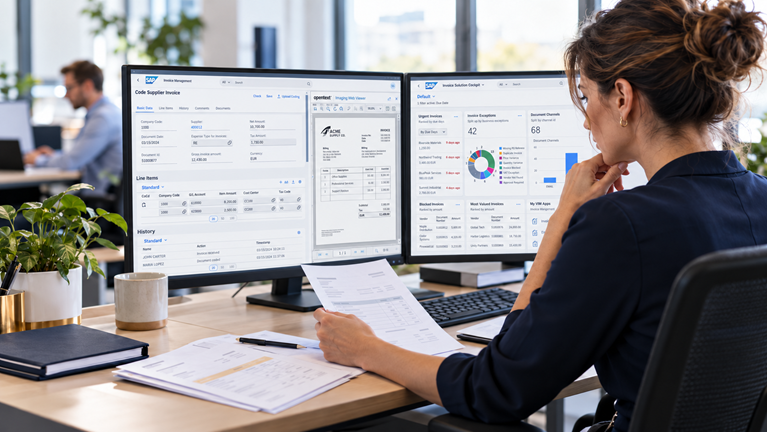
For companies processing invoices in an SAP environment, SAP Invoice Management by OpenText (VIM) helps manage the document's journey from receipt through checks and approvals all the way to posting. Rules and workflows can be configured according to invoice types and real-world scenarios within the company.
For an invoice where all required data is in order, numerous steps can take place automatically. If the system encounters a mismatch, it routes the case to the responsible person. The accountant thus gains full visibility into why a document stopped, who is handling it, and what step should follow.
However, deploying technology alone is not enough. Before designing a solution, it is important to review the current workflow with representatives from accounting, procurement, and other involved departments. It is essential to distinguish checks the company truly needs from steps performed simply because that was how the previous system worked.
For an invoice where all required data is in order, numerous steps can take place automatically. If the system encounters a mismatch, it routes the case to the responsible person. The accountant thus gains full visibility into why a document stopped, who is handling it, and what step should follow.
However, deploying technology alone is not enough. Before designing a solution, it is important to review the current workflow with representatives from accounting, procurement, and other involved departments. It is essential to distinguish checks the company truly needs from steps performed simply because that was how the previous system worked.
Where to Start if Invoices Regularly Get Stuck?
Select several invoices whose processing took unexpectedly long. Trace their path from receipt to posting and note the cause of each delay. Was data missing from the document? Was the purchase order or goods receipt not ready? Was it unclear who to route the invoice to?
Likewise, look at documents that went through smoothly. Comparison will show what is already working and which recurring exceptions are worth solving first. That is often where the greatest potential lies for speeding up the work of accountants and the entire approval workflow.
Likewise, look at documents that went through smoothly. Comparison will show what is already working and which recurring exceptions are worth solving first. That is often where the greatest potential lies for speeding up the work of accountants and the entire approval workflow.
FAQ / Frequently Asked Questions
DO NOT HESITATE TO
CONTACT US
Are you interested in more information or an offer for your specific situation?
-
 AISIN: Digitization of Accounts Payable Invoice Approval in Microsoft 365 Integrated with SAP
-
 Document Automation in Business Central: From EDI to AI Extraction
-
 AI-Powered DMS: How Artificial Intelligence is Transforming Document Management
-
 AI data extraction directly on your infrastructure: Documents that must not go to the cloud
-
 Output Management System: How to Get Documents to Customers Safely, Efficiently, and Error-Free
-
 DocumentExtract: AI solution for automatic document data extraction
-
 Document Archiving as the Foundation of Company Management: How to Choose the Right Approach
-
 How to Manage Contracts in a Company: Contract Lifecycle Management Step by Step
-
 Complaints as a Moment of Truth: Customers Forgive Mistakes, Not Chaos
-
 AI Assistant vs. AI Agent: What Is the Difference and How to Get Started with AI in Your Company
-
 Why is effective document management key to your company's success?
-
 How AI transforms customer communication: From templates to intelligent CCM
-
Automated document classification with AI: Less manual effort, greater context
-
 How to Manage HR Documents in SAP SuccessFactors Effectively
-
 E-invoicing in Slovakia starting in 2027: Why sending invoices electronically is no longer enough
-
 Trusted document storage: more than just a place for files
-
 E-Invoicing Without Delay: Belgium and France Transition to New Standards
-
 Mastering DMS in the SAP Environment: A Practical Guide for SAP-Based Organizations
-
 Extracting Invoices and Other Documents with AI: How to Start and Succeed
-
 Digitalization of contract approvals and document signing across the HP TRONIC Group
-
 Mandatory e-invoicing in the EU from 2030: What does ViDA mean and how can you prepare?
KEEP IN TOUCH
Subscribe to our newsletters so you don't miss anything important.